From 6.25% to 15.37% Conversion Rate
The client initially approached me to run Meta Ads for a single webinar on her AI-built landing page about the new Australian Federal Budget rules for property investors. What started as paid traffic for one event evolved into a full-funnel CRO rebuild and scaling across two live webinars
This was a standalone project where I operated as a one-person growth team.
I owned tracking architecture, landing page UX and UI changes, Meta ads strategy and execution, email and SMS automation, and lead segmentation for the sales handoff.
The client owned the webinar content, the offer, and the delivery on Zoom, and came in with the initial AI-generated landing page and two video ads announcing the webinar.
 WordPress
 Meta Ads
 Zoom
Zoom
 Calendly
 Pipedrive
 GTM
GTM
 PostHog
 FluentCRM
 Brevo
Brevo
CVR = unique registrations divided by unique landing page views, measured in PostHog across all traffic sources, and cross-checked against FluentCRM contacts.
CPL = Meta ad spend divided by Meta-attributed webinar registrations.
Revenue and closed-sales data remained client-controlled and were not available for independent reporting.
The first Webinar
Before driving traffic to the landing page, I put the tracking, registration flow, email automation, and ad campaigns in place to establish a reliable baseline.
Before spending a single dollar on ads, I installed the Meta Pixel and Conversions API, with Lead and CompleteRegistration as the key events. I set up PostHog with custom events for landing page views and completed registrations, then added Microsoft Clarity to review real session recordings. This felt slow at the time, but it became the most valuable decision in the project: every result in this case study is backed by behavioural data, not assumptions.
I built the missing thank-you page and connected FluentCRM to capture every registration. Then I created an 8-email automation sequence: registration confirmation, an educational email, a 24-hour reminder, webinar-day reminders in the morning, one hour before, and 10 minutes before, followed by an offer email one day after the webinar. The goal was not only to generate registrations, but to turn them into live attendees.
I set up the Meta Ads campaigns using the two videos provided by the client. At her request, I launched one campaign with the Traffic objective, alongside a Leads objective campaign, my recommendation, so we could compare how Meta delivered each approach. The Traffic campaign generated volume quickly but converted at under 1% on-page, so I stopped it after limited spend and let the Leads campaign continue with the remaining budget.
I connected FluentCRM to Pipedrive via API so webinar registrations and customer data were added to the CRM automatically. I also connected Calendly to Pipedrive so booked calls were recorded there too.
This kept registrations, bookings, and customer data in one place.
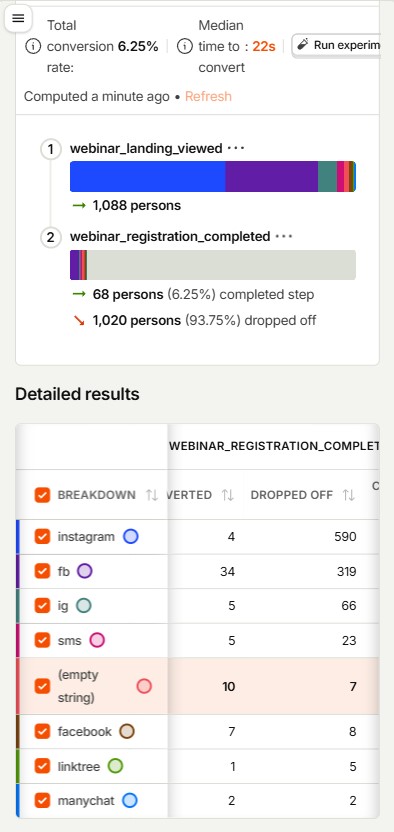
With the full funnel tracked, the webinar gave us the first reliable baseline. My Meta Ads campaigns drove paid traffic, while the client also sent visitors through her Instagram boost, her existing client list, personal network, and direct sharing. Across all sources, the landing page received 1,088 unique visitors and produced 68 registrations, for a 6.25% landing-to-registration conversion rate.
Facebook Ads traffic converted above the overall page average, with a 9.63% landing-to-registration conversion rate.
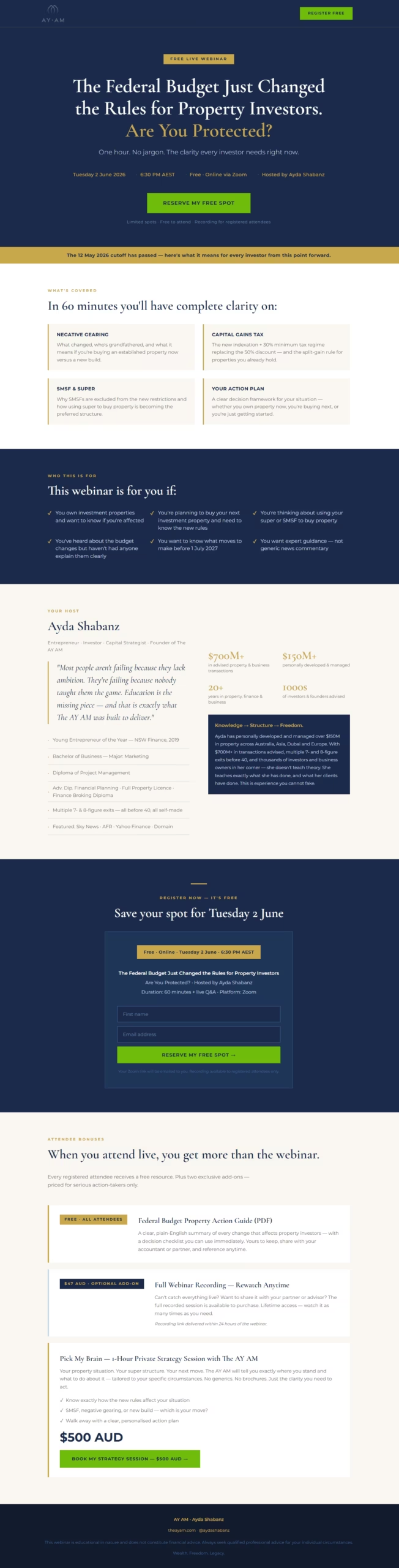
The results confirmed that the webinar topic could attract attention and generate registrations. However, the page-level conversion rate showed a significant gap between landing on the page and completing registration. Too many visitors left without reaching the form.
Microsoft Clarity recordings revealed a consistent pattern. Visitors landed on the page, scrolled briefly, and left. Many visitors appeared to overlook the registration CTA entirely, a clear case of button blindness. With 97% of all traffic coming from mobile devices, the form itself was too far down the page and too easy to miss.
The first webinar delivered decent results. It generated 68 unique registrations, 21 live attendees, and a 30% show-up rate on approximately 317 AUD in Meta spend. More importantly, it gave me a clear diagnosis for the next iteration: make registration visible immediately and remove friction between the ad click and the form.
Unique landing page visitors across all sources
Observations: The registration path was too easy to miss on mobile, and the 30% show-up rate highlighted the limitation of not collecting phone numbers for direct reminders. For the next iteration, I identified three priorities: put the form in the hero, add trust beside it, and capture phone numbers for SMS follow-up.
The Second Webinar
After a strong first webinar, the client decided to run a second session. I used the data and observations from W1 to rebuild the funnel around mobile behaviour and a clearer registration path.
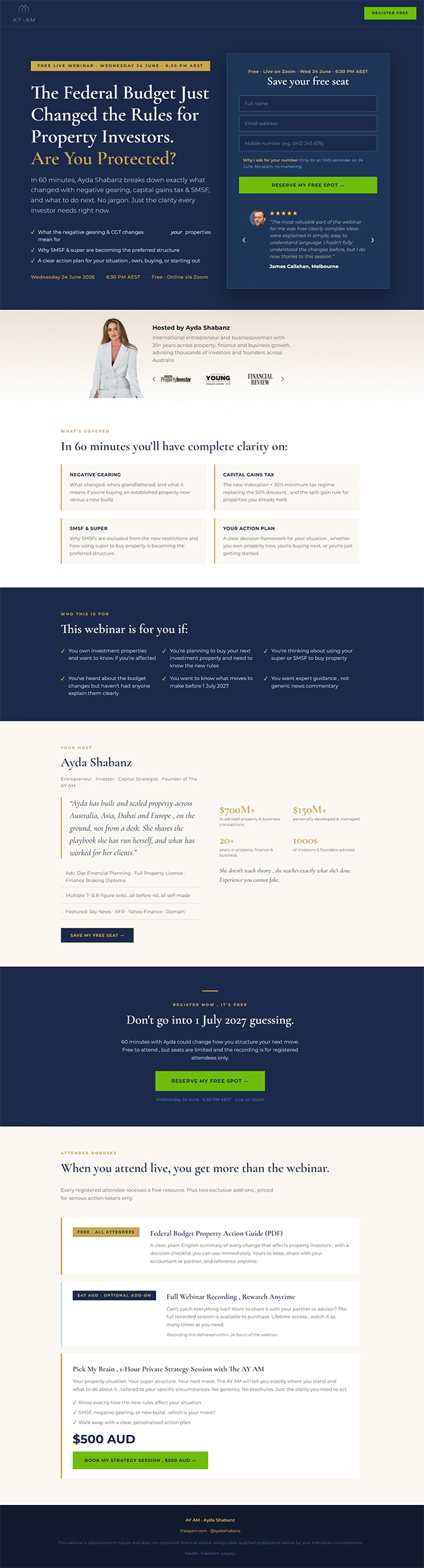
The main W1 issue was clear: too many mobile visitors never reached the form. For W2, I moved the registration form into the hero section, so people could sign up without relying on a scroll-to-form CTA.
I added name, email, and phone fields, together with a short explanation that phone numbers would only be used for webinar reminders. I also placed testimonials, media logos, and a short host bio next to the form to add trust at the point of conversion.
I added more granular tracking for the registration journey, from landing-page view to form visibility, field interaction, and completed registration.
This showed that the biggest W1 problem was not form completion. It was form visibility. Once visitors started the form, most of them completed it, shifting the next optimisation focus to the message and proof above the form.
Based on the W1 comparison, I removed the Traffic objective and focused W2 on the Leads objective. The goal was no longer to buy the cheapest visits, but to optimise delivery toward people more likely to register.
I also kept traffic sources clearly tagged, so I could separate paid acquisition from the client’s own promotion and evaluate each source more accurately.
I used broad targeting and built the audience into the creative itself. Each ad spoke to a specific investor situation, including SMSF investors, property owners, sellers, and people unsure how the new rules affected them.
I also added phone capture at registration so the existing email sequence could be supported with SMS reminders on webinar day. The objective was not just more registrations, but more people joining the session live.
For W2, I improved the Pixel and Conversions API setup with proper browser and server event deduplication, plus richer event data. This improved Meta’s conversion signal quality and reached an Event Match Quality score of 9.3/10.
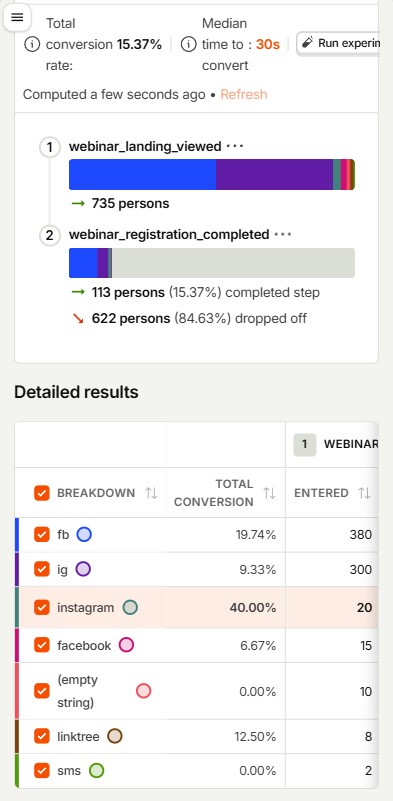
The W2 rebuild increased the overall landing-to-registration conversion rate from 6.25% to 15.37%. PostHog recorded 113 registrations from 735 landing-page visitors across all tracked sources.
Facebook Ads was the largest tracked acquisition source, generating 75 registrations at a 19.74% landing-to-registration conversion rate. The W2 Meta campaign spent 1,346.44 AUD and generated 111 platform-reported website leads.
Registration quality also improved after I introduced phone capture and a structured reminder sequence. The show-up rate increased from 30% to 40%, bringing 46 people live to the webinar.
Overall landing-to-registration conversion rate
Observations: Moving the form into the hero removed the visibility issue identified in W1. With the path to registration fixed, the next conversion opportunity was not form friction, but the message, proof, and offer framing above the form.
What Changed Between the Two Webinars
The second webinar was a sequential relaunch, not a controlled A/B test. Still, the comparison shows how the rebuilt registration path, Leads-first campaign structure, and attendance system changed the funnel outcomes.
| Metric | Webinar 1 | Webinar 2 |
|---|---|---|
| Overall landing-to-registration CVR | 6.25% | 15.37% |
| Landing-page visitors | 1,088 | 735 |
| PostHog registrations | 68 | 113 |
| Facebook Ads tagged CVR | 9.63% | 19.74% |
| Meta ad spend | 316.96 AUD | 1,346.44 AUD |
| Live attendees | 21 | 46 |
| Show-up rate | 30% | 40% |
PostHog is used for on-site conversion and registration data. Meta Ads Manager is used for spend and platform-reported leads.
What These Results Do and Don’t Prove
I believe a useful case study should show its limitations, not just its best numbers.
W1 and W2 were separate live webinars with different topics, budgets, and creative mixes. The results show a meaningful conversion improvement, but they do not isolate the impact of a single change.
Meta Ads Manager reports platform-attributed leads, while PostHog measures completed registrations on the site. Browser blocking, attribution windows, and event deduplication can create a gap between the two.
W2 used a substantially larger budget to drive more registrations and more live attendance. The goal was not the lowest possible cost per lead, but a stronger webinar funnel at higher volume.